HMI touch display for Arduino, ESP32 and STM32, driven over UART
5 inch and 7 inch 800 x 480 IPS displays with an ESP32-S3 on board. Design the screens in free Dsync Studio, then update them from your microcontroller with two wires. An Indian-made alternative to Nextion and DWIN, stocked in Gurugram.
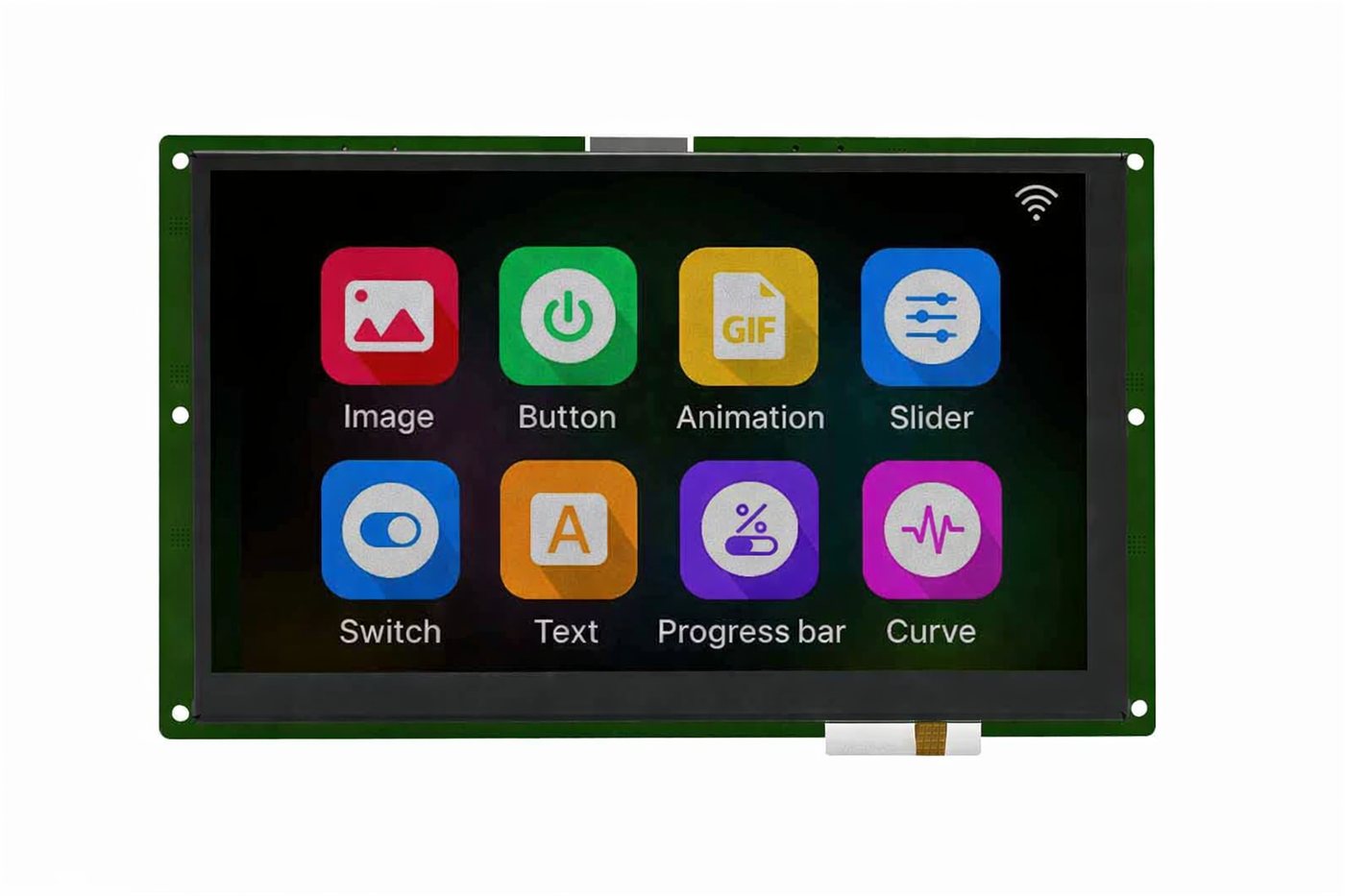
7 inch Smart UART display, part number B-1102-VUI-0700-BX, running a Dsync Studio widget demo
From blank screen to working HMI in an afternoon
No graphics library on your microcontroller, no font rendering, no touch calibration code.
Design in Dsync Studio
Drop gauges, buttons, sliders, text and images onto screens. Name the variables each widget listens to. Test with the built-in simulator.
Flash over USB
One click sends the project to the ESP32-S3 on the display. Fonts, images and animations live on the display, not on your controller.
Wire TX, RX and power
Connect the display UART to any microcontroller UART. Send a value, the widget updates. Touch a button, your controller receives the event.
Ship it
The same part number is stocked for prototypes and supplied in volume, with 400 or 1000 nit and touch options on the same footprint.
Compare all Smart UART displays
Swipe to see more → B-1101-QUI-0500-BX B-1101-QUI-0500-BX Price: - View Product → |  B-1102-VUI-0700-BX B-1102-VUI-0700-BX ₹4,500 View Product → | B-2292-TUN-0500-BX B-2292-TUN-0500-BX Price: - View Product → | B-2289-PUN-0500-BX B-2289-PUN-0500-BX Price: - View Product → | B-1126-VUI-0500-BX B-1126-VUI-0500-BX Price: - View Product → | B-1103-VUI-0700-BX B-1103-VUI-0700-BX Price: - View Product → | B-1098-VUI-0500-BX B-1098-VUI-0500-BX Price: - View Product → | B-2290-PUN-0500-BX B-2290-PUN-0500-BX Price: - View Product → | B-1100-VUN-0700-BX B-1100-VUN-0700-BX Price: - View Product → | |
|---|---|---|---|---|---|---|---|---|---|
| DIAGONAL SIZE | 5 Inch | 7 Inch | 5 Inch | 5 Inch | 5 Inch | 7 Inch | 5 Inch | 5 Inch | 7 Inch |
| RESOLUTION | 800x480 Pixels | 800x480 Pixels | 800x480 Pixels | 800x480 Pixels | 800x480 Pixels | 800x480 Pixels | 800x480 Pixels | 800x480 Pixels | 800x480 Pixels |
| ACTIVE AREA | 108.0 x 64.8 mm | 153.84 x 85.63 mm | 108.0 x 64.8 mm | 108.0 x 64.8 mm | 108.0 x 64.8 mm | — | 108.0 x 64.8 mm | 108.0 x 64.8 mm | — |
| DISPLAY INTERFACE | UART | UART | UART | UART | UART | UART | UART | UART | UART |
| TOUCH PANEL TYPE | CTP | — | — | RTP | CTP | CTP | — | RTP | Optional |
| VIEWING DIRECTION | All | All Deg | All | All | All | All | All | All | All |
| SURFACE BRIGHTNESS | 400 Nits | 400 Nits | 1000 Nits | 400 Nits | 1000 Nits | 1000 Nits | 400 Nits | 1000 Nits | 1000 Nits |
| OPERATING TEMPERATURE | — | -20 to 70 Deg C | — | — | -20 to 70 Deg C | -20 to 70 Deg C | — | — | -20 to 70 Deg C |
Design the screens in Dsync Studio
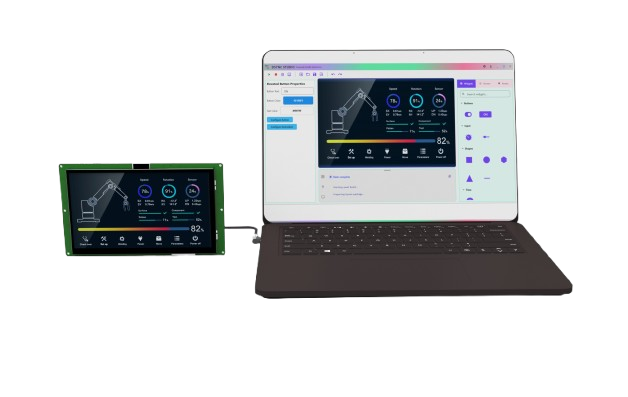
Dsync Studio is BIBA's no-code HMI design software for Smart UART displays. It runs on Windows 10 and Windows 11 and is free from the Microsoft Store. Build a touchscreen interface on a drag-and-drop canvas, connect each widget to a named variable, test it on your PC, and flash it to the display over USB.
- Drag-and-drop canvas: buttons, sliders, gauges, curves, charts, keypads, text and images.
- Live UART data binding: a value sent over serial updates the widget, a touch sends an event back.
- Built-in data simulator: preview the behaviour before any hardware is connected.
- Board catalog: pick your display and the resolution, touch and flash package are configured for you.
- One-click ESP32 flashing: send the finished project to the display over USB.
- Templates, PSD import and multi-screen projects to get from a mock-up to a working interface quickly.
Which Smart UART display should you choose?
Pick by how the display is used. Every model has the same 800 x 480 IPS panel and ESP32-S3 controller.
| If you need | Choose | Why |
|---|---|---|
| To evaluate and prototype | B-1102-VUI-0700-BX (7 inch) | Stocked for online ordering, capacitive touch, 400 nit, published volume pricing. |
| Readable in direct sunlight | B-1103-VUI-0700-BX (7 inch), B-1126-VUI-0500-BX (5 inch) | 1000 nit IPS with capacitive touch for outdoor, solar and agricultural equipment. |
| Gloves, stylus or wet hands | B-2289-PUN-0500-BX (400 nit), B-2290-PUN-0500-BX (1000 nit) | 5 inch resistive touch that works with gloves and a stylus. |
| A compact panel | B-1101-QUI-0500-BX (5 inch) | 108.0 x 64.8 mm active area with capacitive touch and a full viewing angle. |
| Display only, no touch | B-1098-VUI-0500-BX, B-2292-TUN-0500-BX (5 inch) | For read-out panels where a separate keypad or encoder does the input. |
| Touch as an option | B-1100-VUN-0700-BX (7 inch) | 1000 nit 7 inch with optional touch. |
Smart UART display vs bare TFT vs HDMI display
The three common ways to put a touchscreen on a product, and when each one fits.
| Smart UART display | Bare RGB / SPI TFT | HDMI display | |
|---|---|---|---|
| Who draws the screen | The display (ESP32-S3) | Your microcontroller | A Linux or Windows computer |
| Connection to your controller | 2-wire UART plus power | Many parallel or SPI signals | HDMI plus USB touch |
| Graphics work in your firmware | None, only serial commands | Driver, frame buffer, GUI library | A full GUI application |
| Design tool | Dsync Studio, no code | LVGL or custom code | Any desktop UI framework |
| Best with | Arduino, ESP32, STM32, PIC, PLCs | Fast MCUs with spare RAM | Raspberry Pi, Jetson, industrial PCs |
Why engineers pick a Smart UART display over a bare TFT
A bare RGB or SPI TFT needs a capable MCU, a frame buffer and weeks of GUI work. A Smart UART display moves all of that onto the display and leaves your firmware with a handful of serial writes.
Renders its own UI on an ESP32-S3
The display carries an ESP32-S3 with PSRAM that draws every screen, handles touch and runs animations. Your controller never pushes pixels.
Two wires to any microcontroller
TX, RX and power. Send a value over UART at 115200 baud and the gauge, text or progress bar updates. Touch events come back the same way.
No-code UI in Dsync Studio
Drag buttons, sliders, curves and images onto a canvas, bind them to variables, flash over USB. No LVGL, no font tables, no graphics driver to write.
Wi-Fi and Bluetooth LE on board
Because the brain is an ESP32-S3 you get wireless connectivity, an SD card slot and a speaker output on the same module.
400 or 1000 nit IPS, 5 or 7 inch
Capacitive, resistive or no touch. 1000 nit variants read in direct sunlight for agricultural, solar and outdoor equipment.
Designed and built in India
A DWIN or Nextion alternative with local stock, INR pricing, GST invoices and an engineering team in Gurugram that answers the phone.
Works with
Any controller with a serial port. Typical applications are water purifier and air purifier panels, battery and solar monitors, EV chargers, lab instruments, agricultural controllers, commercial kitchen equipment and industrial machine HMIs where a PLC or a small MCU already runs the process.
Frequently asked questions
What is a Smart UART display?
A TFT touch display with its own processor and firmware. You design the screens on a PC, load them onto the display, and your microcontroller only sends short serial commands such as a temperature value or a page change. The display draws everything itself. The category is also called a serial HMI display or an intelligent display module.
Is this a replacement for Nextion or DWIN displays?
Yes, it serves the same purpose. The difference is that the BIBA Smart UART display is designed and made in India, stocked in Gurugram, priced in INR with GST invoices, and the design tool Dsync Studio is free. Projects written for other serial displays are ported by rebuilding the screens in Dsync Studio and mapping the same variables.
Which microcontrollers can drive it?
Anything with a UART: Arduino, ESP32, STM32, Raspberry Pi Pico, PIC, AVR and Linux boards such as Raspberry Pi. Logic levels of 3.3 V and 5 V are both supported.
How do I design the user interface?
With Dsync Studio, BIBA's free Windows application. Place widgets on a drag-and-drop canvas, bind them to named variables, preview with the built-in simulator, then flash the project to the display over USB. See the Dsync Studio feature page for screenshots.
What does the 7 inch model cost?
Part B-1102-VUI-0700-BX is ₹5,000 for 1 to 10 pieces and ₹4,500 at 101 pieces and above, excluding GST. It is stocked for online ordering.
What is the difference between the 5 inch and 7 inch Smart UART display?
Both use an 800 x 480 IPS panel, the same ESP32-S3 controller and the same Dsync Studio toolchain, so a design moves between them with a layout change. The 5 inch has an active area of 108.0 x 64.8 mm and the 7 inch has 153.84 x 85.63 mm. Each size is available in 400 nit and 1000 nit versions.
Which touch and brightness options are available?
Capacitive touch (CTP), resistive touch (RTP) or no touch, in 400 nit and 1000 nit brightness. Choose 1000 nit for direct sunlight and outdoor equipment, and resistive touch when operators wear gloves or use a stylus. The 7 inch B-1100-VUN-0700-BX has optional touch.
Is Dsync Studio free, and which computers does it run on?
Yes. Dsync Studio is free to download from the Microsoft Store and runs on Windows 10 and Windows 11. It is a no-code tool, so you place widgets on a canvas instead of writing display firmware.
What supply voltage and logic levels does the display use?
The UART accepts 3.3 V and 5 V logic, so it connects directly to Arduino, ESP32, STM32, Raspberry Pi Pico and similar boards. The display itself runs from a 5 V or 12 V supply.
Can I use a Smart UART display without writing any graphics code?
Yes. The screens are designed and stored on the display. Your firmware only sends short serial commands, for example a value for a gauge or a page number, and receives touch events back. There is no graphics library, font handling or touch calibration code in your microcontroller project.
Can I buy a single unit, and does BIBA ship across India?
Yes. Single units can be ordered online for evaluation with INR pricing and GST invoices, and volume pricing is published for the 7 inch model. Orders ship from BIBA's facility in Gurugram, Haryana. For OEM volumes and custom versions, request a quote.
Can BIBA customise the display for my product?
Yes. We supply custom brightness, cover glass, cable lengths and mounting for OEM volumes, and because BIBA is also an EMS company we can build the complete control board around the display in our Gurugram facility.
Evaluate one, then scale to your volume
Order the 7 inch online today, download Dsync Studio free, and talk to our engineers when you are ready for a custom brightness, cover glass or a complete HMI board built around the display.